Thursday, January 12, 2012

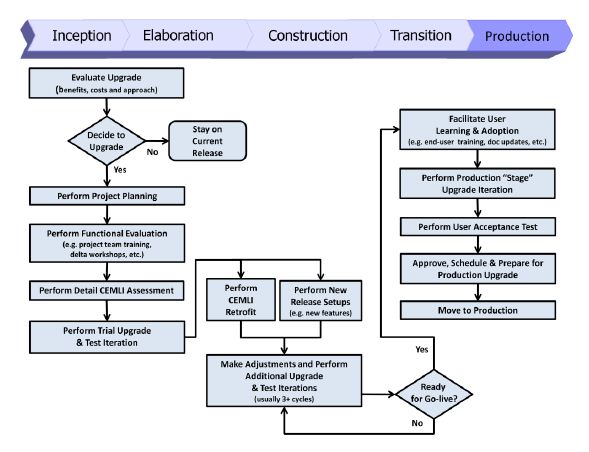
Oracle EBS Upgrade Best Practice

The Picture depicts a high level Flow with OUM state of art
There are many reasons to consider upgrading the current Oracle E-Business Suite version.
For example:
 Upgrading may provide access to new functionality and software applications that can help keep your organization well positioned to meet your business objectives through leveraging the latest technology
 In an increasingly rigorous regulatory compliance environment, upgrading may facilitate compliance at a lower cost through retiring customizations and deploying standard processes across your organization
 Upgrading allows you to leverage the latest performance and usability enhancements, enabling you to increase the efficiency of your applications utilization and your business
 You may need to upgrade to remain eligible for the highest levels of product support
 You may need to upgrade to remain eligible for tax and regulatory updates for your applications

New Release of Oracle Retail POS

Oracle Unveils New Release of Oracle Retail Point-of-Service

Enhancements Simplify Globalization, Improve Security and Integration

Redwood Shores, Calif. – Jan. 11, 2012

KEY CAPABILITIES

 Delivers a superior shopping experience with cross-channel, save-the-sale, and optional line-busting functionality.
 Increases productivity and speeds employee training with an intuitive, easy-to-use graphical user interface.
 Includes customer purchase, profile, and loyalty information to increase customer intimacy. Ensures accurate pricing at the point-of-sale with robust promotional pricing capabilities, including “best deal” and preferred customer.
 Enables cross-store inventory search capability.
 Centrally retrieve transaction data to facilitate returns.
 Implements unique business rules through easy to modify parameters.
 Ensures correct item price for non-receipted returns.
 Direct inventory updates to Oracle Retail Store Inventory Management.
 Unique Identification Number validation through Oracle Retail Store Inventory Management.

Tuesday, January 10, 2012

Oracle Order Management -- Status

Order Management Order/Line/Additional Status Summary info


Saturday, December 31, 2011

Oracle Unified Methodology- Templates FAQ

Is there an equivalent to the AIMBR.100 Application Setup template?

OUM contains an Application Setup Document template associated with task DS.030 Define Application Setups, which is comparable to the AIM BR.100. The template is product agnostic and can be tailored to address any applicationproduct. The guidance for tailoring the generic template is included in the Yellow Notes included in the template itself.
If you don’t see the Yellow Notes, select Tools->Options from the MS Word menu, select the View tab, and Select Hidden Text for viewing. Similar templates for documenting setup information and parameters are also provided for the following tasks:RA.040 Define Business Data StructuresDS.010 Define Business Data Structure Setups

Is there an equivalent to the AIM RD.020 Business Process Baseline template?-

There are no equivalent Process Questionnaires in OUM. In OUM, the client's future business processes and associated configuration decisions are discussed during preparation of the RD.011 Future Process Model.

Wednesday, December 28, 2011

Oracle iSetup -- Templates Table


General Foundation----> This Selection Set is used to migrate AOL Foundation set ups.
Product Foundation----> This Selection Set is used to migrate Foundation set up needed before migrating any other setup data for other products.
Organization Structure--->This Selection Set is used to migrate the Organization Structure setup
All Profile Options----> This Selection Set is used to migrate all exportable profile options.
Employees----> This Selection Set is used to migrate Employees data.
Financials Setup----> This Selection Set is used to migrate Financials setup.
General Ledger Daily Rates----> This Selection Set is used to migrate General Ledger Daily Rates setup.
Suppliers----> This Selection Set is used to migrate Suppliers setup.
Discrete Mfg. and Distribution----> This Selection Set is used to migrate the Discrete Manufacturing and Distribution setups.
Financials Operating Unit Level Setup----> This Selection Set is used to migrate operating unit level setups in Oracle Payables, Oracle Receivable and Cash Management modules.
Payroll Element----> This Selection Set is used to migrate HRMS Payroll Elements.
Australian Leave Liability----> This Selection Set is used to migrate Australian leave liability setup.
Profitability Manager Setups---->This Selection Set is used to migrate Profitability Manager setups.
Transfer Pricing Setups---->This Selection Set is used to migrate Transfer Pricing Setups.
Projects Setup----> This Selection Set is used to migrate Projects setup.
Personalizations----> This Selection Set is used to migrate Personalizations
XML Publisher----> This Selection Set is used to migrate XML Publisher Metadata, Templates, Translations, XML Sample and Schema
Workflow Business Event System Objects----> This Selection Set is used to migrate Workflow Business Event System Objects Definitions
Workflow Definitions----> This Selection Set is used to migrate Workflow Definitions.
Lease Management Setups----> This Selection Set is used to migrate Lease Management Setups.


Oracle iSetup-- Introduction

Oracle iSetup, a data migration and reporting tool, is a part of the Oracle E-Business
Suite.

This tool consists of the Migrator and the Reporter:
• The Migrator helps you to migrate data from one instance of the Oracle E-Business Suite to
another. Following are the steps to migrate data:
• Extract select data from an Oracle E-Business Suite instance.
• Transform select attributes of the extracted data objects as per your requirements.
• Load data to the target Oracle E-Business Suite instance.

The Reporter helps to generate reports:

• Generate reports on the extracted data.
• Compare two sets of extracted data to identify differences.
Note: Transforming the attributes is an optional step.

There are many scenarios where Oracle iSetup can be used. Following are some of these:

Migrate Data
The CRP instance is configured and ready for test by the quality team. Then now:
1. Migrate select configuration to the test instance.
2. After testing, modify the configuration in the CRP instance.
3. Migrate the configuration to the production instance.